Back to Blog
Kubernetes
kubernetes
architecture
containers
devops
Kubernetes Architecture Explained (With Pictures, Not Just Words)
A visual, diagram-first walkthrough of how a Kubernetes cluster actually works — control plane, worker nodes, networking and rollouts, explained one picture at a time.
Chandan Mishra12 July 2026
Most explanations of Kubernetes architecture bury you in paragraphs before you ever see how the pieces fit together. This one flips that: every section leads with a diagram, and the words underneath just explain what you're looking at.
The Big Picture
Every Kubernetes cluster is really just two kinds of machines working together — a control plane that makes decisions, and worker nodes that run your actual application Pods.
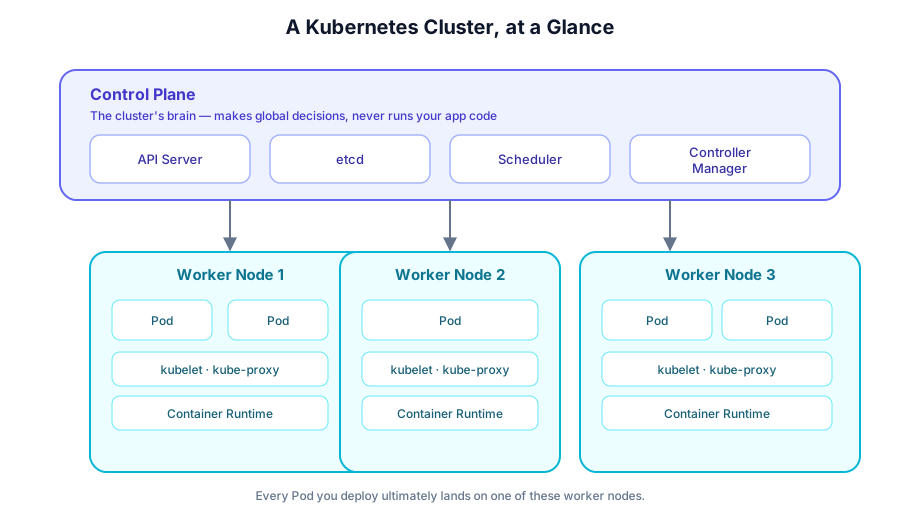
The control plane never runs your application code directly — it only tells the worker nodes what should be running.
Inside the Control Plane
Zooming in, the control plane is four components that constantly talk to each other through one front door: the API Server.
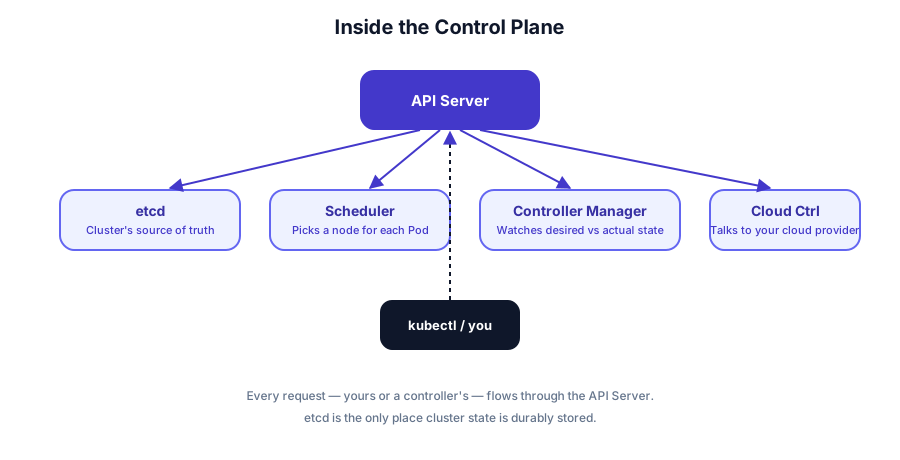
- API Server — the only component anything talks to directly, including
kubectl. - etcd — a key-value store holding the entire cluster's desired and current state.
- Scheduler — decides which node a new Pod should run on.
- Controller Manager — constantly reconciles "what you asked for" with "what's actually running."
What Runs on Every Worker Node
Every worker node runs the same three things, no matter how many Pods it hosts.
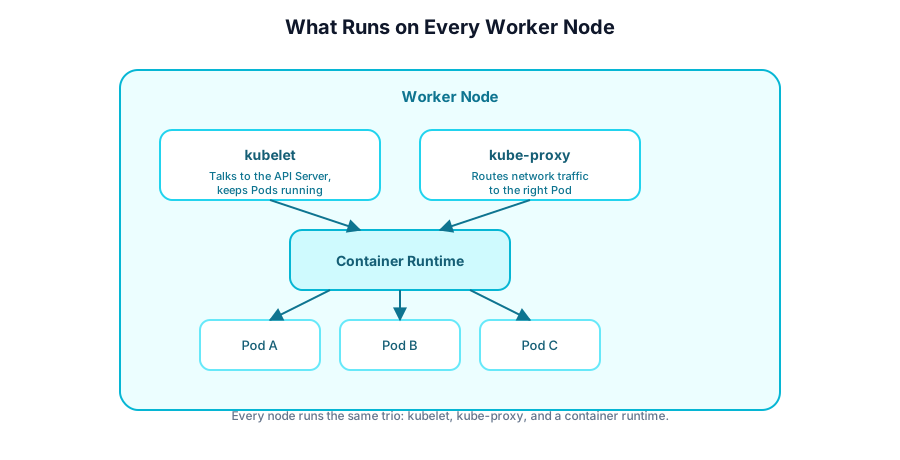
- kubelet — the agent that takes instructions from the API Server and keeps Pods alive.
- kube-proxy — routes network traffic to the right Pod on that node.
- Container runtime — actually pulls images and starts containers (containerd, CRI-O, etc.).
How Pods Get Created (and Replaced)
When you ship a new version of your app, Kubernetes doesn't just kill everything and restart it. A rolling update scales the new version up while scaling the old one down, one Pod at a time.
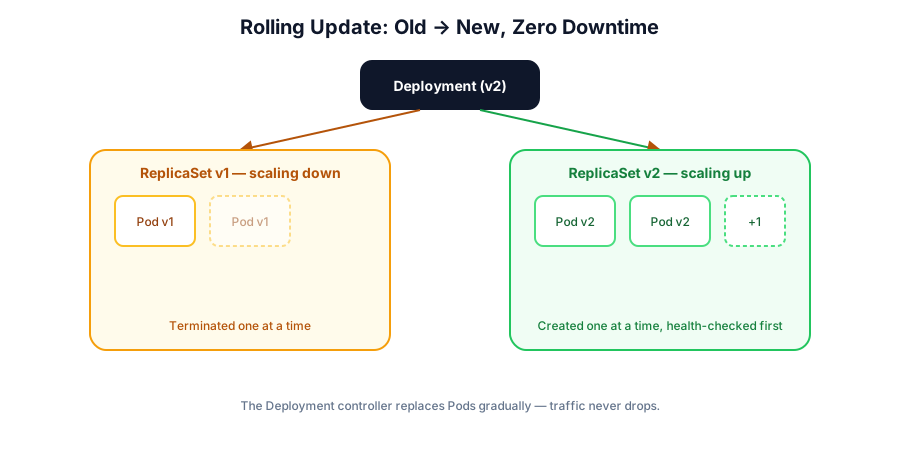
This is why a well-configured Deployment can ship a new release with zero downtime — there's always a healthy Pod ready to serve traffic.
How Traffic Reaches Your Pods
Pods are disposable and their IP addresses change constantly. A Service gives them a stable address and load-balances across whichever Pods currently match its label selector.
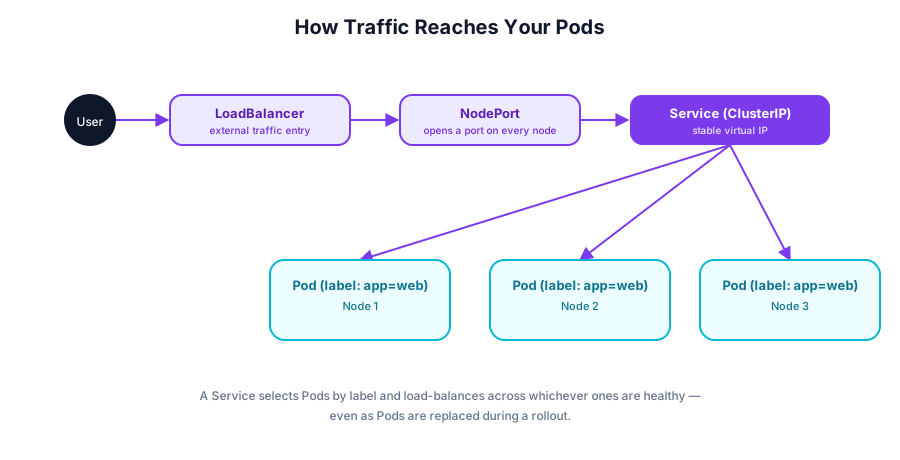
Whether traffic enters through a LoadBalancer, a NodePort, or stays internal via ClusterIP, it always ends up at the Service first — the Service is what actually finds a healthy Pod.
Putting It All Together
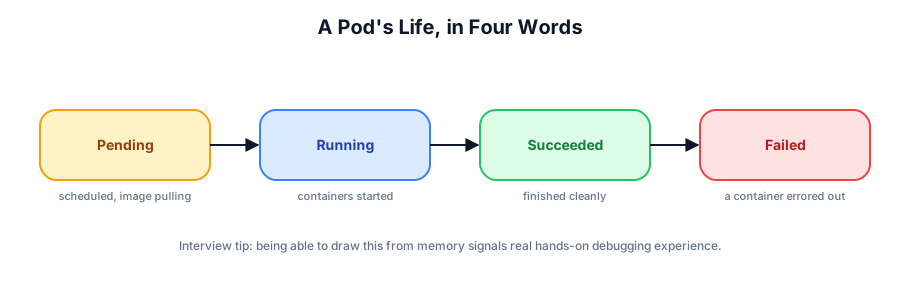
Zoom in on any single Pod, and its life is short and predictable.
Why This Matters in Interviews
Interviewers rarely ask you to recite definitions. They ask "walk me through what happens when I run kubectl apply" — and the strongest answers trace the exact path through these diagrams: API Server → etcd → Scheduler → kubelet → container runtime → Service. If you can sketch any one of these diagrams from memory on a whiteboard, you're already ahead of most candidates.
Summary
Kubernetes architecture is simpler than it looks once you separate "the control plane decides" from "the worker nodes execute." Learn these five pictures, and the terminology stops being abstract — it becomes a map you can navigate under pressure.